

Reporters
Tapsmith includes a reporter system inspired by Playwright. Reporters receive lifecycle events during a test run and produce output in various formats.
Configuration
Section titled “Configuration”Configure reporters in tapsmith.config.ts:
import { defineConfig } from "tapsmith";
export default defineConfig({  // Single reporter  reporter: "list",
  // Reporter with options  reporter: ["json", { outputFile: "results.json" }],
  // Multiple reporters  reporter: ["list", ["json", { outputFile: "results.json" }]],});
Default: When reporter is not set, Tapsmith uses the list reporter everywhere, including CI. Set reporter: 'dot' explicitly if you prefer the compact one-character-per-test output in CI. The github reporter is automatically added when running in GitHub Actions.
Built-in reporters
Section titled “Built-in reporters”| Reporter | Description | Default |
|---|---|---|
list |
Detailed per-test output with status, name, and duration | All runs |
line |
Concise single-line output, overwrites previous line | — |
dot |
Minimal output: one character per test (· / F / ×) |
— |
json |
Structured JSON file with full test data | — |
junit |
JUnit XML for CI system ingestion | — |
html |
Self-contained interactive HTML report | — |
github |
GitHub Actions annotations on failures | Auto in GH Actions |
blob |
Serialized data for shard merging | — |
Reporter options
Section titled “Reporter options”json
| Option | Type | Default |
|---|---|---|
outputFile |
string |
"tapsmith-results/results.json" |
junit
| Option | Type | Default |
|---|---|---|
outputFile |
string |
"tapsmith-results/results.xml" |
html
| Option | Type | Default |
|---|---|---|
outputFolder |
string |
"tapsmith-report" |
open |
"always" | "never" | "on-failure" |
"on-failure" |
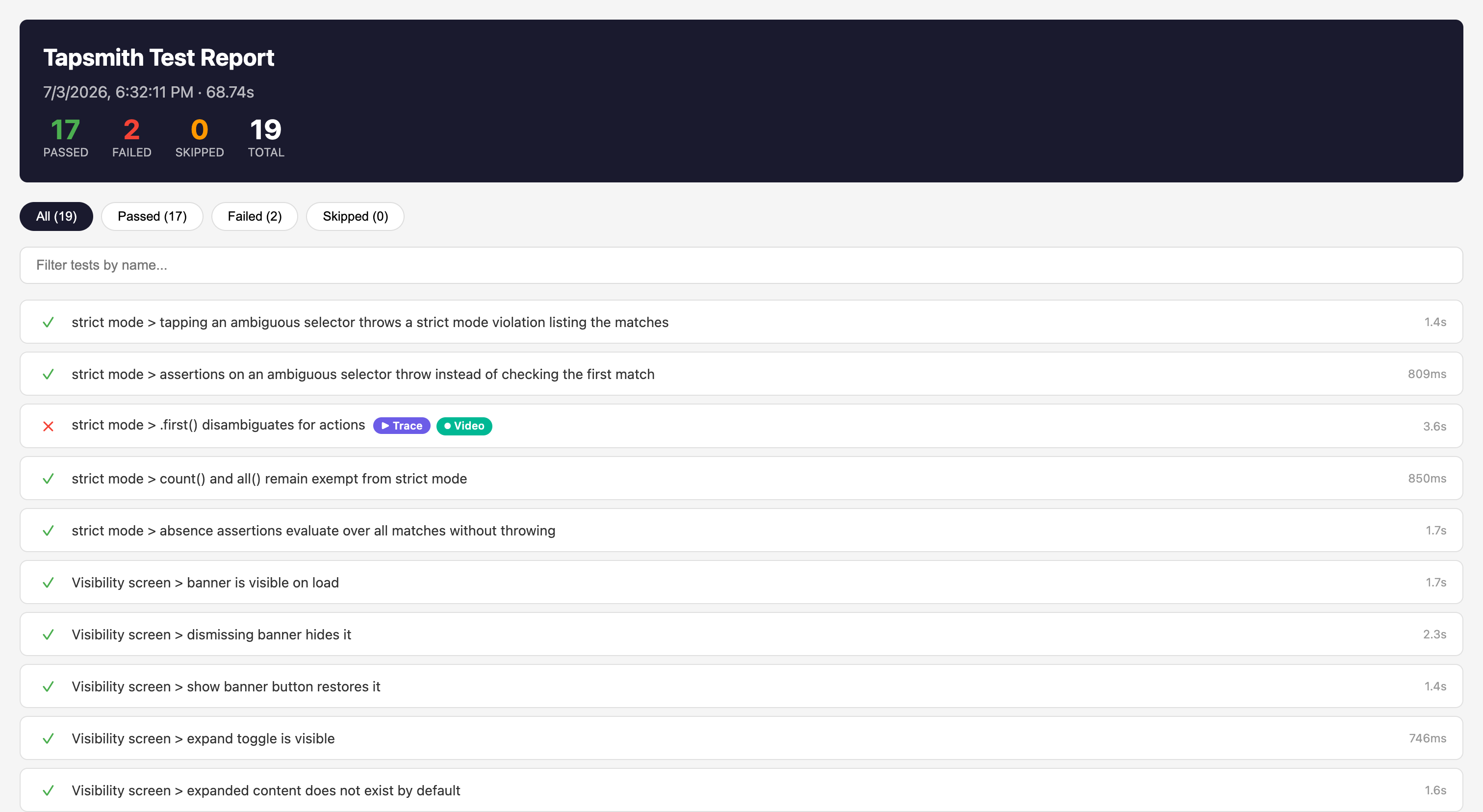
The HTML report is a self-contained page with pass/fail summary, filtering, and per-test durations, with links to each failure’s trace and video:
blob
| Option | Type | Default |
|---|---|---|
outputDir |
string |
"blob-report" |
The blob reporter empties outputDir at the start of every run (before any device launch), as Playwright’s does, so each
run leaves exactly one blob (plus its trace and video attachments) and an earlier run’s results
can’t be merged as though they were this run’s. Point outputDir at a dedicated directory. If
outputDir is, or contains, the project root or the working directory, tapsmith test stops
with an error before launching any device. Clearing it would delete the project. A shard that gets no test files still writes an empty blob, so merge-reports can tell an
empty shard from a missing one. UI mode writes no blobs and leaves outputDir alone. Shards run
at the same time on one machine each need their own outputDir, or one run’s clearing deletes
another’s blob. Playwright behaves the same way.
Custom reporters
Section titled “Custom reporters”Implement the TapsmithReporter interface:
import type { TapsmithReporter, FullResult, RunStartInfo } from "tapsmith";import type { TestResult } from "tapsmith";
class MyReporter implements TapsmithReporter {  onRunStart(config, fileCount, info?: RunStartInfo) {    // `tapsmith merge-reports` runs no tests, so it has no file count.    if (!info?.merge) console.log(`Running ${fileCount} test files`);  }
  onTestEnd(test: TestResult) {    console.log(`${test.status}: ${test.fullName}`);  }
  onRunEnd(result: FullResult) {    console.log(`Done in ${result.duration}ms`);  }}
export default MyReporter;
Use by path in config:
export default defineConfig({ reporter: [["./my-reporter.ts", {}]],});TapsmithReporter interface
Section titled “TapsmithReporter interface”All types are importable from "tapsmith":
import type { TapsmithReporter, FullResult, TapsmithConfig, TestResult, SuiteResult, RunStartInfo,} from "tapsmith";interface TapsmithReporter { onRunStart?(config: TapsmithConfig, fileCount: number, info?: RunStartInfo): void; onTestFileStart?(filePath: string): void; onTestStart?(fullName: string, filePath?: string): void; onTestEnd?(test: TestResult): void; onTestFileEnd?(filePath: string, results: TestResult[]): void; onTestFileRetry?(filePath: string, discardedCount: number): void; onRunEnd?(result: FullResult): Promise<void> | void; onError?(error: Error): void;}
interface RunStartInfo { // True when `tapsmith merge-reports` is replaying shards' blob reports: // no tests run, and `fileCount` is 0. merge?: boolean;}TestResult
Section titled “TestResult”interface TestResult { name: string; fullName: string; status: "passed" | "failed" | "skipped"; durationMs: number; error?: Error; firstAttemptError?: Error; // on a flaky (passed-on-retry) result: the first failed attempt's error failedAttemptArtifacts?: { screenshot?: boolean; trace?: boolean; video?: boolean }; // which linked artifacts came from the failed attempt screenshotPath?: string; tracePath?: string; // path to the trace archive (.zip) when tracing is enabled videoPath?: string; // path to the recorded MP4 when `video` is enabled and retained workerIndex?: number; // set in parallel mode — index of the worker that ran this test retry?: number; // zero-based attempt number this result was recorded on (omitted for a first-attempt pass) filePath?: string; // path to the test file this result belongs to warnings?: string[]; // things that did not fail the test but a reader should know, e.g. the app's own ANR dialog the preflight closed fileLevelFailure?: boolean; // the result stands for a whole file that failed to load, not a test in it}A test file that fails to load — a missing module, an error thrown while it is
imported or inside a describe() callback — reports a single failed result in
place of its tests: name and fullName are "<file name> — failed to load" (e.g. "login.test.ts — failed to load"),
fileLevelFailure is true, filePath names the file, and error is the load
error. None of the file’s tests run; every other file still does, and the run
counts it as a failure.
For a flaky test (failed, then passed on retry) the final result links the
first failed attempt’s trace, screenshot, and video — the failure is what
needs debugging, and shipping pipelines (blob reports, CI artifacts) only pack
linked files. The failed attempt’s error is kept in firstAttemptError, and
console reporters print it in the flaky section of the run summary. When the
failed attempt has no artifact of a given kind (e.g. trace: "on-first-retry"
records nothing on the first attempt), the passing retry’s artifact is linked
instead.
SuiteResult
Section titled “SuiteResult”interface SuiteResult { name: string; durationMs: number; tests: TestResult[]; suites: SuiteResult[]; // nested describe() blocks}FullResult
Section titled “FullResult”interface FullResult { status: "passed" | "failed"; duration: number; // total wall-clock time in milliseconds (including setup) setupDuration?: number; // time spent on device provisioning, APK install, agent startup tests: TestResult[]; // flattened list of all test results suites: SuiteResult[]; // hierarchical suite tree (one per test file)}When setupDuration is present, console reporters show a timing breakdown:
Summary: 12 passed | 45.2s (setup 30.1s, tests 15.1s)